Planner
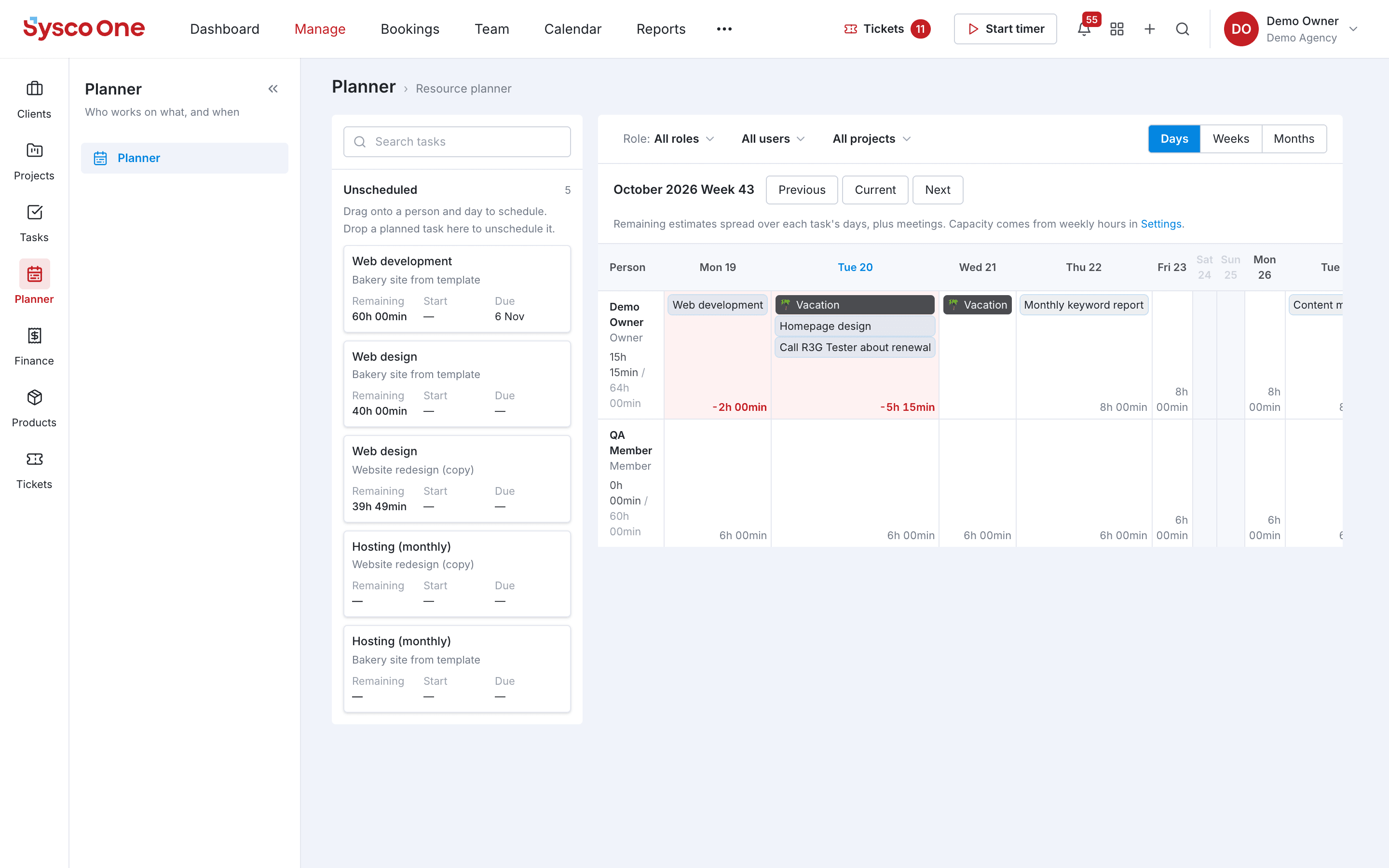
Resource & capacity planning
See who is free, who is overbooked and plan capacity before deadlines slip.
Why teams use it
Resource & capacity planning, done properly.
Part of one shared workspace, so Planner data is already connected to your clients, projects and invoices.
Drag-and-drop scheduling
Drop unscheduled tasks onto a person and a day; drag them back to unschedule.
Capacity per person
Weekly hours set each person's capacity, and over-booked days turn red.
Days, weeks or months
Zoom from a single week to the whole quarter, filtered by role, person or project.
Time off included
Vacations, bookings and meetings appear in the same plan as the work.
Inside Planner
Every page in the Planner menu.
What you'll find in the side menu and tabs, and what each one does.
Connected by default
Works hand in hand with
Tasks
Assign work, set due dates and follow every task from to-do to done, in lists or on the board.
- List and board views
- Priorities and owners
Projects
Phases, budgets, milestones and the whole team's activity on one project page.
- Budget vs. actual
- Timeline
Equipment
Check gear in and out, book kits for shoots and know where every asset is.
- Check-out and reservations
- Kits